The action checks whether a file name matches one or more file masks and saves the result to a user variable.
This is useful when a task already has a file name and only needs to make a simple decision based on the name or extension. For example, the task can check whether the current file is a document, an image, an archive, or any other file type described by a mask, without adding extra string parsing steps.
The action does not open the file and does not check whether the file exists on disk. It compares the specified file name with the specified mask and returns True or False.
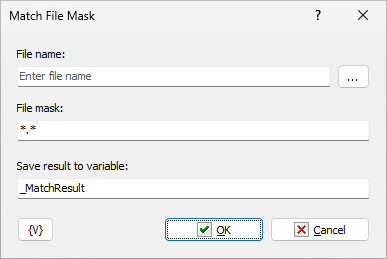
File name
Enter the file name to check.
The value can be a simple file name, such as report.pdf, or a full path, such as C:\Incoming\report.pdf. Variables are allowed.
File mask
Enter the file mask to compare with the file name.
The mask can contain standard wildcard characters:
•* matches any sequence of characters.
•? matches any single character.
You can specify several masks separated by commas. The action returns True when the file name matches at least one mask from the list.
Examples:
*.txt
*.doc,*.docx,*.rtf
invoice_????.pdf
backup_*.zip,backup_*.7z
Variables are allowed in this field.
Save result to variable
Enter the name of the user variable where the action will store the result.
The action writes one of the following values:
•True when the file name matches the mask.
•False when the file name does not match the mask.
The default variable name is _MatchResult.
Example
Suppose the task receives a file name in the {FileName} variable and needs to process only PDF and Microsoft Word documents.
Use the following settings:
File name: {FileName}
File mask: *.pdf,*.doc,*.docx
Save result to variable: IsDocument
After this action runs, the {IsDocument} variable contains True for file names such as contract.pdf or report.docx, and False for file names such as photo.jpg or archive.zip.
The next step in the task can use this variable in a condition to choose the appropriate processing branch.
 Related Topics