The action terminates the process that owns a specified application window.
Use this action when the task can identify an application by one of its windows, but the process name is not known in advance or is not reliable enough. The action finds the window, gets the process ID from that window, and then forcefully terminates that process.
This action is similar in purpose to the Terminate Process action. The difference is that Terminate Process selects the target process by process name, while Terminate Process by Window selects the target process through a window.
Terminating a process is a forceful operation. The target application does not get a normal request to close and may lose unsaved data.
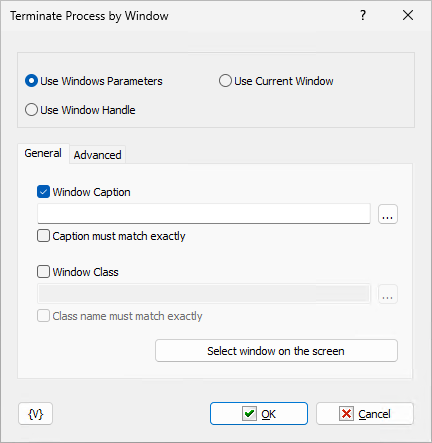
Window Selection
The action can select the target window in one of three ways.
Use Windows Parameters
The action searches for a window that matches the specified window parameters.
You can use the window caption, the window class, or both. Variables are allowed in these fields and are expanded at runtime.
When an exact match option is disabled, the action searches for the specified text as a part of the actual caption or class name. The comparison is case-insensitive. When an exact match option is enabled, the whole caption or class name must match the specified value.
The Select window on the screen button can be used while configuring the action to fill the caption and class fields from an existing window.
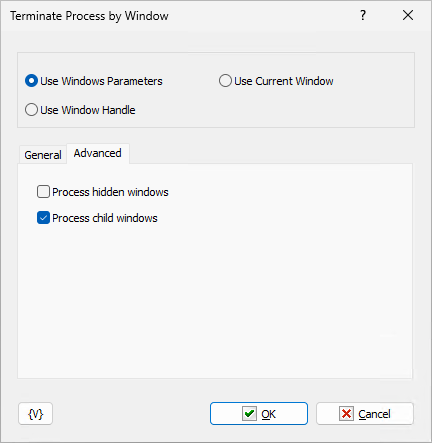
Advanced options define which windows are included in the search:
•Process hidden windows allows the action to match windows that are not visible.
•Process child windows allows the action to match child windows.
If several windows match the specified parameters, the action uses the first matching window found during enumeration.
Use Window Handle
The action uses the specified window handle directly.
This mode is useful together with actions that return or store a window handle, such as a window loop. You can specify a numeric handle or a variable that contains the handle value.
Use Current Window
The action uses the current foreground window at the moment when the task runs.
Parameters
Window Caption
Enables filtering by the window caption.
Enter the caption text to search for. Variables are allowed.
Caption Must Match Exactly
Requires the actual window caption to be equal to the specified caption text.
If this option is disabled, the specified text may appear anywhere inside the actual window caption.
Window Class
Enables filtering by the window class name.
Enter the class name to search for. Variables are allowed.
Class Name Must Match Exactly
Requires the actual window class name to be equal to the specified class name.
If this option is disabled, the specified text may appear anywhere inside the actual class name.
Process Hidden Windows
Includes hidden windows in the search.
If this option is disabled, only visible windows can be matched.
Process Child Windows
Includes child windows in the search.
If this option is disabled, the action matches only windows that do not have a parent window.
Window Handle
Specifies the window handle to use in Use Window Handle mode.
Variables are allowed. For example:
{WINHANDLE}
Example
Suppose a task needs to stop an application whose main window caption contains the current document name stored in the {DocName} variable.
Use the following settings:
Find mode: Use Windows Parameters
Window Caption: {DocName}
Caption must match exactly: disabled
Window Class: disabled
Process hidden windows: disabled
Process child windows: enabled
When the task runs, the action searches for the first visible matching window, identifies the process that owns it, and terminates that process.
 Related Topics