Page 1 of 1
Created batch file seems....incorrect
Posted: Sat Oct 17, 2026 5:08 pm
by Rukbunker
On a task, I created a batch file on the desktop. When I execute it, he doesn't like it. What do I miss here? I created it by right clicking "Create batch file" and added the pause command to see why I didn't ran.
When I run the task itself in Robotask, it works great.
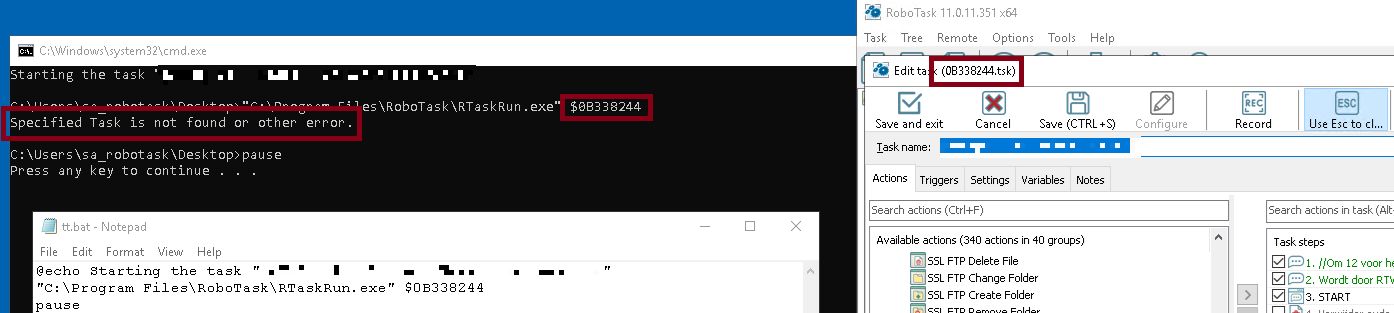
- weirdbat.jpg (66.85 KiB) Viewed 197 times
Re: Created batch file seems....incorrect
Posted: Sat Oct 17, 2026 5:38 pm
by Oleg
Very interesting...
Could you send this CMD file as it is to me by email (as attachment)?
I want to take a look at this...
Re: Created batch file seems....incorrect
Posted: Sat Oct 17, 2026 5:51 pm
by Rukbunker
I've sent you a PM on this forum, I know sometimes cmd/bat files are blocked with emails.
Re: Created batch file seems....incorrect
Posted: Sat Oct 17, 2026 6:02 pm
by Oleg
This is possible when the task is busy. For example the task is opened in task editor or running.
In this case you will get exactly this error.
Close task editor and try again.
Re: Created batch file seems....incorrect
Posted: Sun Oct 18, 2026 2:06 pm
by Rukbunker
This is possible when the task is busy. For example the task is opened in task editor or running.
In this case you will get exactly this error.
Close task editor and try again.
I did, but no difference. The task wasn't busy and the editor wasn't opened. When I run the task in Robotask manually it responds as it should.
I've tried it with 2 other tasks: same behaviour.
Re: Created batch file seems....incorrect
Posted: Sun Oct 18, 2026 3:01 pm
by Oleg
Maybe RoboTask is running in "As administrator" mode?
In this case you will get the same error. You must run you CMD/BAT file with administrative permissions too.
You cannot send commands to an application with higher privileges.
Re: Created batch file seems....incorrect
Posted: Wed Oct 21, 2026 1:38 pm
by Rukbunker
Correct, that was the trick! Run as admin: batchfile works.
Re: Created batch file seems....incorrect
Posted: Wed Oct 21, 2026 2:28 pm
by Oleg
To run some command line with rights elevation use RG.EXE utility:
Running command line with the rights elevation.
Location:
"C:\Program Files\RoboTask\RG.exe"
Usage:
RG.exe [/p] <command_line>
/p - RG waits when the command will be finished